Adding a local collection for a database
If a collection does not exist in the CZ, you can create one locally in your IZ.
How to do this:
Open the Resources menu.
- Select "Add Local Electronic collection."
- Alma will open the Electronic Collection Editor. Fill in the information.
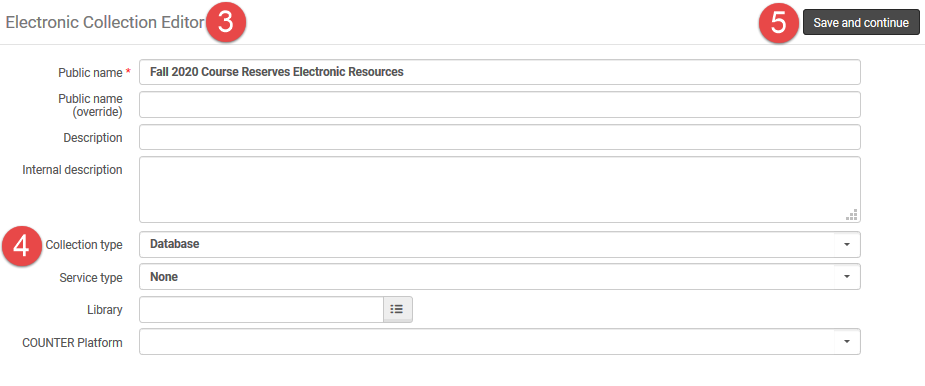
- Select the Collection Type of "Database."
- Click "Save and Continue."
- Alma will open the Electronic Collection Editor. There will be a pop-up confirmation message that Alma created the collection successfully. This message is misleading. You must click "Save" as instructed in Step 7 for Alma to create and save the collection.
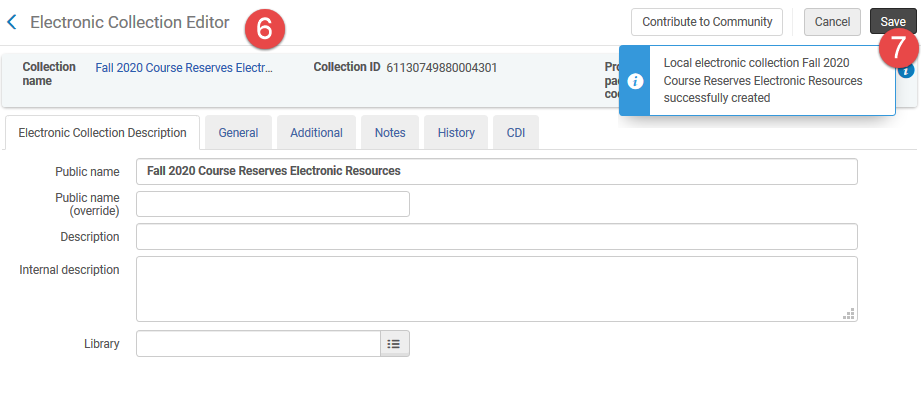
- Click "Save." You can make changes to the collection record before doing so.